
Description
Lesson Plans on Your Own Computer: Meet the Offline Edition
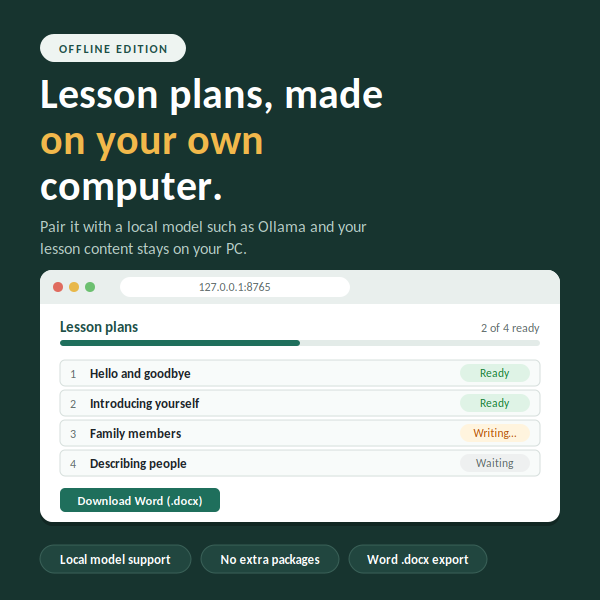
Not every teacher wants another account, another subscription, or another website. The Offline Edition of Lesson Plan Generator runs on your own computer and turns the table of contents of any book into complete, editable lesson plans.
Simple to start
You need Python and nothing else, because the app uses no extra packages. On Windows, double-click start.bat. On Mac or Linux, run start.sh. Your browser opens a clean page on your own machine, and you can begin right away. The app listens only on your own computer, so other devices on your network cannot reach it.
How it works
Paste a table of contents or load a text file. The app finds units and lessons, and you choose which ones to create. Each lesson receives objectives, key terms, materials, a timed stage table, assessment ideas, support and extension tasks, homework, and teacher notes.
Everything is editable. Change a stage, rewrite an example, or add your own notes, then download a Word document or an HTML file you can print to PDF. Your work is autosaved in the browser, so a refresh will not lose it.
Keep your content private
Connect the app to a local model such as Ollama, and the lesson content stays on your computer. You need the internet only once, to download Ollama and a model. Small models are slower and may write simpler plans than large cloud models, and the app retries once if a reply is malformed, but for many teachers the privacy is worth it.
Prefer higher power? Choose Anthropic Claude or any OpenAI-compatible service instead and paste your API key. Your settings are stored in a private file on your computer.
Made for real lessons
Choose a teaching framework such as PPP, 5E, gradual release, or direct instruction. Set the lesson length, learner level, and output language, so one book can produce plans in English, Vietnamese, or any language your model supports. Add notes such as class size or equipment, and paste a short chapter summary so the plans follow your book’s terminology. Lessons are written with their neighbors in mind.
Who it suits
Independent tutors, home educators, and teachers in schools with strict data rules will appreciate a tool that works quietly on their own laptop. Install it once, pick your model, and turn a contents page into a week of lessons.

Reviews
There are no reviews yet.